TweetSim is a browser-based set of tools for making tweet-style images. There are two importantly different jobs: designing a fictional mockup and capturing a real public post. Choosing the right one keeps the result useful and avoids presenting invented text as something a person actually said.
I want to write my own example
Use the fake tweet maker. Its live preview follows the name, handle, text, engagement counts, theme, and badge you choose. Profile and tweet-image inputs are separate.
For a presentation about building habits, try the fictional message:
Fictional example: Small steps count. Today I finished the first page of my project.
Use a fictional identity and keep the label in the text. The worked editor tutorial gives exact values and a screenshot of the controls. That walkthrough also explains number formatting and the mobile preview’s limits.
This workflow makes an image; it does not publish a post to X.
I want an image of something already posted
Use the tweet-to-image converter. Paste a public post’s link, generate its preview, and download the PNG. This is the appropriate path for quoting a real post in an article or presentation.
A concrete example is Jack Dorsey’s first tweet:
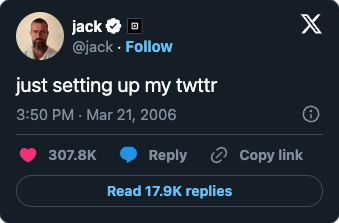
An actual converter preview, not text entered in the fictional tweet maker. Appearance and counts may change.
The converter accepts individual post links from both x.com and twitter.com. It does not let you rewrite the source text. Follow the real-post conversion guide for the exact steps and troubleshooting.
I need an account-status illustration
Choose the blocked, restricted, or suspended generator. Each creates a preset account-status mockup with an editable name, handle, and theme.
These images describe a fictional scenario. They are not account checks or proof of moderation. The account-status tutorial walks through a labelled example.
What should I expect from the current tools?
The editors are available without a TweetSim sign-in, and their download actions create PNG files. They do not add a TweetSim watermark to the captured card. Add your own fictional-example caption where appropriate.
The fake tweet editor lets you choose a date and time and share a PNG through supported devices’ share menus, with a download fallback. Its reply count does not create reply messages. For a conversation, use the reply-chain generator to add up to six replies with individual authors, images, dates and engagement counts, then download or share one combined PNG.
The converter depends on the public post being available to its embedding service. A private or deleted post cannot be made accessible by changing its URL.
A simple final check
Before sharing, open the downloaded image and ask: is this a fictional illustration or a real quotation? Keep mockups clearly labelled. For real quotations, include the original post link and enough context for someone to verify it.
Start with the editor walkthrough if you need creative control, or try the converter example if you already have a real post in mind.